Last Updated on December 12, 2025
As a passionate learner of data visualization through Udacity, and other platforms, I’ve completed numerous data analysis courses that deepened my appreciation for tools like Tableau, hands down my favorite data visualization app.
Inspired by the principles of Edward Tufte, a pioneer in effective data and evidence presentation, I’ve used Tableau’s intuitive interface to turn complex data into clear, powerful visuals that make stunning dashboards a breeze to create.
Even with AI tools everywhere, mastering data visualization basics is key to creating insights that connect with stakeholders.
With the data visualization market expected to hit $19.2 billion by 2027 (per Fortune Business Insights), driven by tech, finance, and healthcare, now’s the time to learn Tableau through top online courses.
This guide reviews the best options to build your skills in 2025.
📊 Why Learn Tableau?
Tableau’s drag-and-drop interface makes creating interactive dashboards easy, no coding needed. Its clickable filters and real-time updates bring data to life, revealing patterns that spreadsheets miss. In my opinion it is the best application to start your career as a data visualization analyst. Having used tools like PowerBI and Excel in my day job, freelancing, and personal projects, I can attest that Tableau’s intuitive design and ease of navigation stand out. It integrates with Excel, SQL, and cloud services for powerful business intelligence. Learning Tableau can boost your career, with skills linked to higher salaries and job prospects due to demand for Tableau developers as per Datacamp.
💡 Top Online Courses Reviewed
I’ve reviewed these based on my hands-on work with similar programs. Here’s a curated list of top Tableau training online options, focusing on quality, accessibility, and real-world applicability.
1. Tableau’s Official eLearning and Free Training:
From my perspective, starting with the source is smart:
- Tableau offers free video tutorials and on-demand eLearning paths covering basics to intermediate level topics like dashboard building and data storytelling.
- The free “Tableau basics” series is perfect for newcomers, I often recommend it to beginners because it’s quick and practical, risk-free, no fees or subscriptions you might forget to cancel, and you can learn at your own pace.

- Paid instructor-led sessions, or self-guided tutorials are also available for those who want to dive deeper, or advance fast into certifications.

- Depth: Beginner to intermediate. Advanced levels available with instructor-led sessions.
- Hands-on Projects: Real-world data projects, including interactive viz for K-12, but more self-directed.
- Certification: Offers 36 certifications, like Tableau Desktop Specialist ($100 exam fee).
- Cost: Free for basics; paid eLearning varies from self-paced eLearning at $10 USD/month, or instructor-led classes for $1,200 to $1,400 USD/2 days.
- Duration: Varies by learning path. Self-paced free courses vs. Paid on-demand eLearning and instructor-led sessions of 1 or 2 days.
2. Udacity Data Visualization Nanodegree:
As a current Udacity mentor and project reviewer, I’ve seen firsthand why their Data Visualization Nanodegree is a standout for learning data visualization with Tableau.
The program takes you from the basics of choosing visuals, designing Tableau dashboards, to the nuances of crafting compelling storytelling with data through hands-on projects.

The program blends on-demand learning with 24/7 human support, perfect for busy learners.
I have completed two courses in a month, basically a 2-for-1 deal!
With occasional offers and a subscription that unlocks other courses, it’s a win for committed lifelong learners.

- Depth: Beginner-friendly but comprehensive. Udacity’s subscription lets you move to advanced courses fast.
- Hands-on Projects: 8 projects mentor reviewed, from prototyping dashboards to animated data stories. Human support 24/7.
- Certification: Udacity Nanodegree certificate upon completion.
- Cost: Monthly subscription (cancel anytime).
- Duration: 77 hours.
3. Coursera Data Visualization with Tableau Specialization (University of California, Davis):
This 5-course Coursera specialization, taught by UC Davis instructors, dives into Tableau fundamentals, design principles, analytics, and data storytelling, though it doesn’t offer university credit.
I love its focus on the core principles, and a succinct and manageable 47 hours introductory Tableau course.
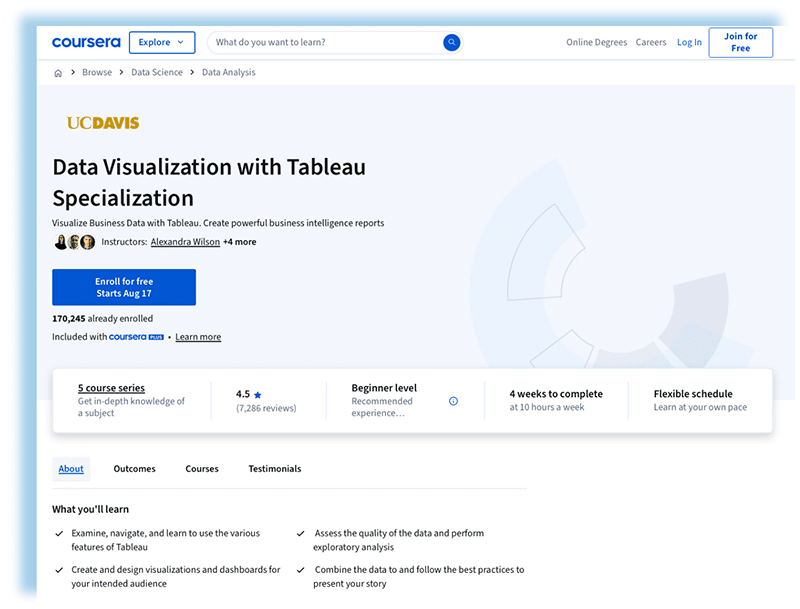
With a 7-day free trial there’s no risk going wrong, and $49/month subscription thereafter, it’s a solid pick for self-paced learners.

- Depth: Beginner to intermediate; strong on predictive analytics and KPIs.
- Hands-on Projects: Capstone Project to prepare a presentation to the executive leadership of a fictional company.
- Certification: Certificate doesn’t carry university credit, but some universities may choose to accept specialization certificates for credit.
- Cost: 7-day free trial, then $49 USD/month
- Duration: 47 hours.
4. Udemy Tableau Ultimate Course (25 Hours): From Zero to Hero (2025):
This Udemy course by Baara Khatib Salkini covers Tableau from fundamentals to advanced dashboards.
While I haven’t taken it, the curriculum appears comprehensive and uses strong visual aids to make complex concepts easier to grasp.

I’ve had good experiences with other Udemy courses bought at deep discounts (often 80%+ off), so timing a sale can offer great value.
Just note that course quality and instructor support vary because creators are independent.

- Depth: Focuses on fast learning, general overview of most features, and practice though multiple quizzes.
- Hands-on Projects: Multiple quizzes, downloadable resources.
- Certification: Udemy certificate.
- Cost: $79.99 USD (look for discounts or other courses alternatives)
- Duration: 25 hours.
5. LinkedIn Learning Tableau Essential Training:
LinkedIn Learning’s Tableau Essential Training covers data connection, visualizations, and storytelling in a tight 5-hour package that covers the basics and key Tableau features.
The 1-month free trial is perfect for a quick start, and for LinkedIn Premium users get this plus other data visualization courses for free, a no-brainer!
You’ll customize charts and build dashboards, but additional courses or projects are needed for full Tableau mastery.

- Depth: Basic level focused on fundamentals to get you going fast.
- Hands-on Projects: 12 quizzes and many short videos with examples.
- Certification: LinkedIn certificate.
- Cost: 1-month free trial. ($39 USD/month for standalone LinkedIn users, or free for LinkedIn Premium users).
- Duration: 4 hours 43 minutes.
🧭 Alternative Ways to Learn Tableau
There are many more options for learning Tableau:
- DataCamp’s Introduction to Tableau, a beginner-friendly course with interactive exercises.
- Simplilearn’s Tableau Desktop Specialist Certification Training, with their online bootcamp with scheduled completion dates and 24/7 support for $750 USD, down from $1,125.
- You can also consider local colleges and regional online providers that also offer workshops and in-depth programs.
Pick the best based on self-paced learning, human support, budget, and reputation.
Comparison Criteria
To choose wisely, compare the value proposition of each platform and match the key factors to your personal preference:
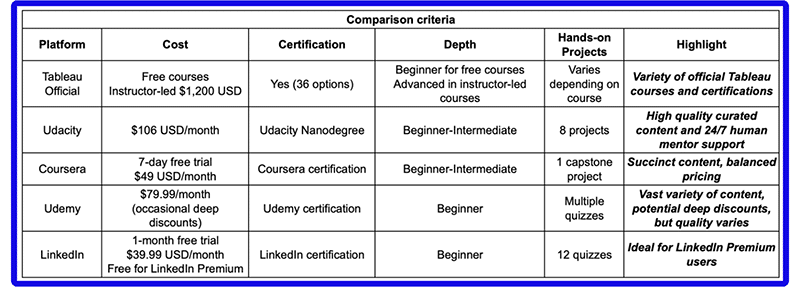
💡 My personal journey started with Udacity which gave me a solid foundation (with strong human support).
I refined specific skills through Udemy and LinkedIn Learning, and I finished by earning the Tableau Desktop certification.
✅ Tips for Choosing the Right Course
Based on mentoring hundreds of learners, here’s my take:
- Tailor your path to your level and goals, but the most important thing is to start, don’t overthink it!
- Create your Tableau Public account and dive in.
- For a risk-free start, use free trials and even YouTube videos.
- If you’re busy, quick hits on LinkedIn Learning or affordable discounted Udemy courses can build momentum.
For a career-oriented track aimed at completing a certification, consider Udacity or Coursera, and choose Udacity if you want more human support and mentorship.
In the end, it’s about personal preference. I’ve tried many platforms and appreciated the strengths each offers.
🗂️ Building a Tableau Portfolio
A strong portfolio showcases your skills, and in data analysis and visualization you can present concrete evidence of competence and experience.
You don’t need to be an expert to begin building your portfolio: The sooner you start, the better.
Udacity Nanodegrees help you build your first set of career-grade projects for a professional portfolio.
- Create a GitHub account to host data notes, datasets and READMEs of your projects. GitHub is your public, verifiable portfolio. It allows you to show your work, reproducible analyses, version-control, and data visualization workflows that hiring managers can assess instantly.
- Join the Tableau User Group Community for feedback and meeting people in real life. If you ever need a boost of inspiration, check out Tableau Viz of the Day.

Conclusion
In 2025, it’s easier than ever to learn Tableau, the leading data visualization and analysis tool, options range from free courses and trials to independent creators and curated programs with 24/7 human support.
Explore the free Tableau Public version, and join communities like the Tableau User Groups to meet likeminded people and further fall in love with data visualizations.
I invite you to start with a course that fits your needs, practice, dig into real datasets, and share meaningful insights, then turn that work into a growing portfolio.
➡️ Ready for the next step?
Enroll in Udacity’s Data Visualization Nanodegree to gain hands-on Tableau skills and storytelling expertise. It is project-based and prepares you for real roles!
Additionally, check the Business Analytics Nanodegree, which includes Tableau for analytics foundations. These programs are ideal because they offer mentor support, real projects, and certificates that stand out to employers.
Personally, I’ve seen them launch careers!