Last Updated on December 6, 2024
Table of Contents
Whenever you interact with a web application, you’re initiating HTTP requests behind the scenes. These requests are the foundation of modern web development, enabling everything from simple page navigation to complex data operations. Among the various HTTP methods available, GET and POST are the most commonly used but choosing between them isn’t always straightforward.
At their core, GET requests retrieve data from servers while POST requests send data to servers. However, there’s much more nuance to when and how to use each method effectively, as we’ll explore below.
When making HTTP requests, whether GET or POST, the server always responds with a status code that indicates what happened with the request. While there are many HTTP status codes, here are some common ones you’ll encounter:
- 200 (OK): The request succeeded, here’s your data
- 404 (Not Found): The page doesn’t exist
- 403 (Forbidden): You don’t have permission to access this
- 500 (Server Error): Something went wrong on the server
Status codes are grouped into categories: 200s for success, 300s for redirections, 400s for client errors, and 500s for server errors. These codes help developers understand exactly what happened with their requests and are essential for debugging web applications.
Understanding GET Requests
Think of GET requests as library catalog searches. They’re designed to retrieve information without making any changes to the system. When you type a URL into your browser or click a link, you’re typically making a GET request.
Figure 1: How GET requests work (all data visible in the URL)
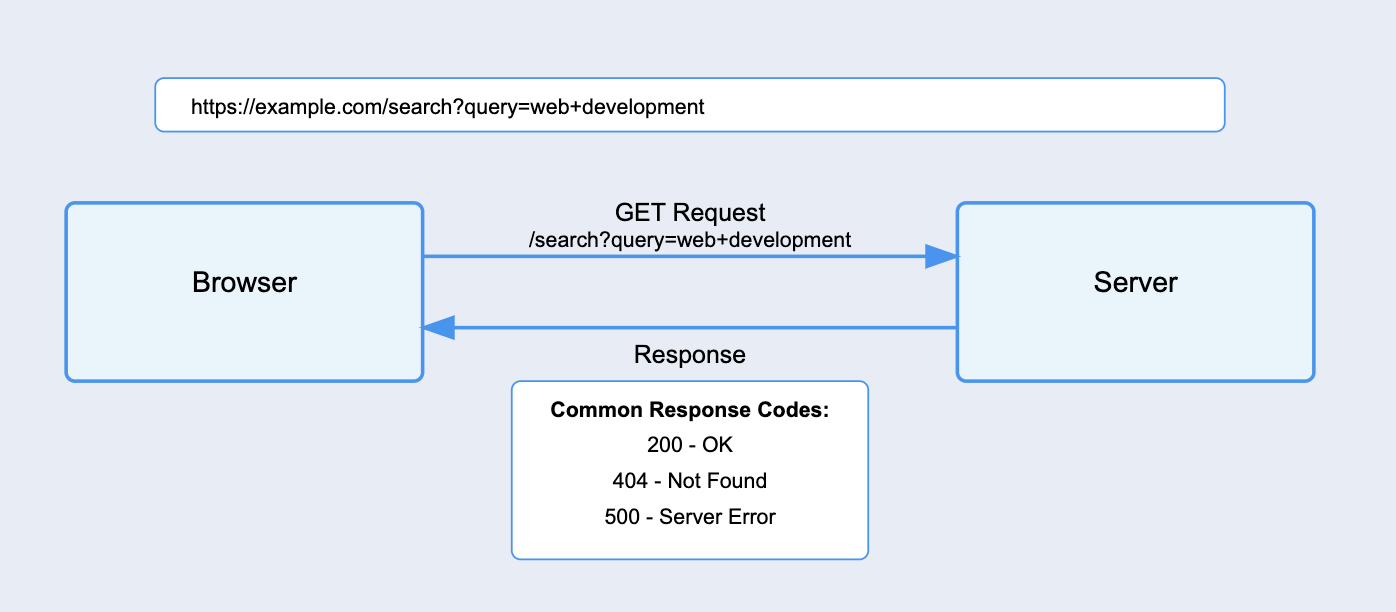
Another typical use case of GET requests is search functionality. Here’s how you can create a basic search form:
| <form action=”/search” method=”GET”> <input type=”text” name=”query” placeholder=”Search for articles…”> <button type=”submit”>Search</button> </form> |
When a user submits this form, the browser creates a URL that includes their search term. If someone searches for “web development,” the resulting URL would look like this:
| https://example.com/search?query=web+development |
Notice how all parameters in GET requests are visible in the URL, making them perfect for shareable content. This is why you can copy a Google search URL and send it to a friend. They’ll see exactly what you searched for.
GET requests also have built-in browser features that make them especially useful. They can be:
- Bookmarked for later use
- Cached by the browser to load faster next time
- Shared easily with others
- Found in browser history
You might have heard about a 2048-character limit for URLs in GET requests, however, different browsers and servers can handle different URL lengths, and modern browsers are quite generous with what they accept.
Still, it’s a good idea to keep your URLs on the shorter side to avoid any compatibility issues. What’s more important to remember is that any data in a GET request shows up right there in the URL. This means you should never use GET for sensitive information, no matter how long or short the URL might be.
Understanding POST Requests
While GET requests are great for retrieving data, POST requests handle the heavy lifting of sending data to servers. Every time you submit a login form, upload a file, or post a comment, you’re using a POST request behind the scenes.
Unlike GET requests, POST requests send data in the request body (a dedicated space in the HTTP request that’s separate from the URL). Think of it like the difference between writing an address on an envelope (GET) versus putting a letter inside it (POST).
Figure 2: POST requests keep your sensitive data hidden

This is what a typical login form that uses POST looks like:
| <form action=”/login” method=”POST”> <input type=”email” name=”email” placeholder=”Email” required> <input type=”password” name=”password” placeholder=”Password” required> <button type=”submit”>Log In</button> </form> |
When submitted, this form sends data securely in the request body, keeping sensitive information like passwords hidden from the URL bar.
Comparing GET and POST
While both GET and POST can be used to submit forms, they serve different purposes and have distinct characteristics as you can see in this table:
Table 1: Key differences between GET and POST methods
| Feature | GET | POST |
| Primary Use | Retrieving data | Submitting data |
| Data Location | URL parameters | Request body |
| Data Visibility | Visible in URL | Hidden in request body |
| Maximum Size | Limited (~2048 chars) | No practical limit |
| Caching | Can be cached | Not cached |
| Bookmarking | Supported | Not supported |
| Browser History | Saved | Not saved |
| Security | Less secure | More secure |
| Idempotency | Yes (same result) | No (may change) |
Forms can work with either method because HTML was designed to be flexible. When you submit a form with GET, the data gets appended to the URL. When you use POST, the same data goes into the request body instead. However, just because both methods work doesn’t mean they’re equally suitable.
Understanding the appropriate use cases for each method is important if you want to build secure and efficient web applications.
Use GET for:
- Search functionality
- Product listings
- Article pages
- User profiles
- Dashboard views
Use POST for:
- Login/Registration forms
- File uploads
- Comment submissions
- Creating new content
- Updating user settings
Security should always be your primary concern when choosing between GET and POST. While HTTPS encrypts all data in transit for both methods, POST requests offer an additional layer of privacy by keeping data out of URLs. This matters because:
- URLs often get logged in server logs, browser histories, and proxy servers
- URLs can be accidentally shared in screenshots or bookmarks
- API keys or tokens in URLs might get exposed through referrer headers
- Browser extensions can read and modify URL parameters
Some common security pitfalls that you should avoid are:
| <!– ❌ Never use GET for sensitive data –> <form action=”/login” method=”GET”> <input type=”password” name=”password”> </form> <!– ❌ Avoid exposing API keys in GET requests –> <script> fetch(`/api/data?key=YOUR_SECRET_API_KEY&user=${userId}`) .then(response => response.json()) .then(data => console.log(data)); </script> <!– ❌ Avoid GET for operations that modify data –> <a href=”/api/delete-account?user=123″>Delete Account</a> |
Real-world security vulnerabilities could happen if GET requests are misused. For example:
- A social media site could expose authentication tokens in URLs
- An e-commerce platform could reveal order details in GET parameters
- A banking application could show account numbers in the URL
- An API service could expose sensitive query parameters in server logs
Also, while it might work technically, using POST for simple data retrieval adds unnecessary complexity and breaks expected browser behavior:
| <!– ❌ Avoid POST for simple data retrieval –> <form action=”/search” method=”POST”> <input type=”text” name=”query”> </form> <!– ❌ Unnecessarily complex API endpoint –> fetch(‘/api/products’, { method: ‘POST’, body: JSON.stringify({ category: ‘electronics’ }) }) <!– ✅ Better approach using GET –> fetch(‘/api/products?category=electronics’) |
The Bottom Line
The choice between GET and POST comes down to what you’re trying to achieve. GET requests are perfect for retrieving and sharing data, while POST requests are the best way to securely submit information to servers. Remember:
- Use GET when you want the request to be bookmarkable, shareable, and cached
- Use POST when dealing with sensitive data, file uploads, or creating/updating resources
- Consider the visibility, security, and size of your data when choosing between them
POST requests offer better privacy for sensitive data but they’re not a substitute for proper security measures. Always use HTTPS to encrypt all traffic, implement proper authentication, and follow security best practices regardless of the HTTP method you choose.
Modern web development continues to evolve, but these fundamental HTTP methods remain crucial to building robust applications. If you understand their differences you can make informed decisions that impact both user experience and security. Whether you’re building a simple contact form or a complex web application, choosing the right HTTP method is essential for maintaining web standards and protecting user data.
As you continue your development journey, you’ll encounter more advanced HTTP methods like PUT, PATCH, and DELETE. However, mastering GET and POST provides the foundation you need to understand these more specialized methods.
Want to learn more about web development? Check out Udacity’s Full Stack Web Developer Nanodegree program.