Last Updated on June 3, 2026
A developer connects an LLM to a search tool, wraps it in a loop, and asks it to research a topic, cross-check the findings against internal records, revise its plan based on what it finds, and produce a final recommendation. The first step works. The agent searches, retrieves something plausible, and generates a confident-sounding response. Then it forgets what it just did. It searches again. It contradicts its earlier output. It never checks the records. It declares the task complete anyway.
This is the most common failure mode when building AI agents, and most tutorials never surface it. They stop at the part that works: a single prompt, a single tool call, a convincing reply. A chatbot that responds in a loop is not the same thing as an agent.
The missing layer is state management. State is what lets an agent remember what happened, track where it is in a task, and decide what should happen next. Without it, you get a system that can generate plausible text but cannot complete real-world tasks.
This article breaks down why that gap matters. It covers how tools expand what agents can do, why state is the foundation for reliable execution, how agentic RAG improves retrieval through iteration, and what multi-agent systems demand from coordination. The professionals who understand these concepts are the ones building systems that actually work, not just systems that demo well.
How tools transform AI agents from passive to active
An LLM without tools can only work with the text in its context window. It can summarize, rewrite, and generate. It cannot check a database, verify a fact against live data, or trigger a downstream action. Tools change that equation entirely.
Tools function like a utility belt for agents. They give an agent the ability to move from describing what it would do to actually doing it. A tool-equipped agent can look up a customer record, run a calculation, search the web for recent information, or send an update to another system. That shift from passive responder to active problem-solver is what separates a chatbot from something closer to an agent.
What “tools” actually mean in an agent system
A tool is any external capability an agent can call to get data or take action. That includes APIs, executable functions, database queries, search interfaces, workflow triggers, and software integrations. The agent decides when to invoke a tool, what inputs to pass, and how to use the result. Tools are not decorative plugins. They define the boundary between what an agent can talk about and what it can actually do.
Common tool types and what they enable
- Web search or browsing tools: Retrieve recent information the base model was never trained on. Useful for fact-checking, news monitoring, or competitive research.
- Math or code execution tools: Perform reliable calculations or transformations instead of relying on the model to approximate arithmetic.
- Database or CRM access: Pull customer, product, or transaction records directly. Critical for support, sales, and operations workflows.
- Calendar, email, and task tools: Schedule meetings, send notifications, or update task boards in downstream systems.
- Document retrieval tools: Surface relevant policy documents, contracts, or technical specifications from internal knowledge bases.
Each of these expands the agent’s action space. A support agent with CRM access can look up an order. A research agent with web search can verify a claim. A finance agent with a code execution tool can run a discount calculation without hallucinating the math.
Why tools still do not make an agent production-ready
Tools enable individual actions. They do not enable sequences. An agent might call the right tool once and produce a useful result. But ask it to call three tools in order, store the intermediate outputs, detect a failure, and retry with a different approach, and you quickly run into the real limitation. Without a way to track what has happened and what still needs to happen, even a well-tooled agent breaks down across multi-step tasks. Tools enable action. What enables continuity is state.
The importance of state management in AI agent execution
Most LLM calls are stateless. The model receives a prompt, generates a response, and retains nothing. Every call starts from zero. That works fine for single-turn questions. It does not work when the task requires gathering information, making a decision, acting on it, evaluating the result, and deciding what to do next.
Many tutorials skip state management because it is less visually dramatic than a tool call or a streaming model response. But state is the structural foundation that separates a demo from a working system.
What “state” means in plain English
State is the information an agent needs to carry forward from one step to the next. Think of it like a support ticket. The ticket tracks who submitted it, what the problem is, which steps have been taken, what is still unresolved, and who is responsible for the next action. Without that tracking, every agent who touches the ticket starts from scratch.
State in an agent system works the same way. It is not just conversational memory. It is operational context. That can include:
- The user’s original intent
- Which tools have been called and what they returned
- Intermediate results or partial outputs
- Task status (in progress, blocked, complete)
- Pending actions or next steps
- A log of failures or retries
This is the information that keeps a workflow coherent across time.
Why stateless prompting breaks in real workflows
A single prompt can answer a question. A real agent task often requires a sequence: gather information, evaluate it, choose a tool, store the output, decide whether to continue or stop. Without state, the system loses the thread between those steps.
Consider an expense approval workflow. The agent needs to check the submitted amount, look up the employee’s approval limit, verify budget availability, flag policy exceptions, and route the request. If the agent cannot remember that it already checked the budget and found a shortfall, it might approve the expense anyway or restart the entire process from the beginning.
The same pattern appears in customer support escalation, IT operations triage, and research tasks that span multiple retrieval rounds. The failure is not a lack of intelligence. It is a lack of orchestration over time.
State machines make agent behavior predictable
A state machine is just a system that moves between well-defined steps. That concept sounds academic, but the value is purely practical: control.
In an agent workflow, states might look like this:
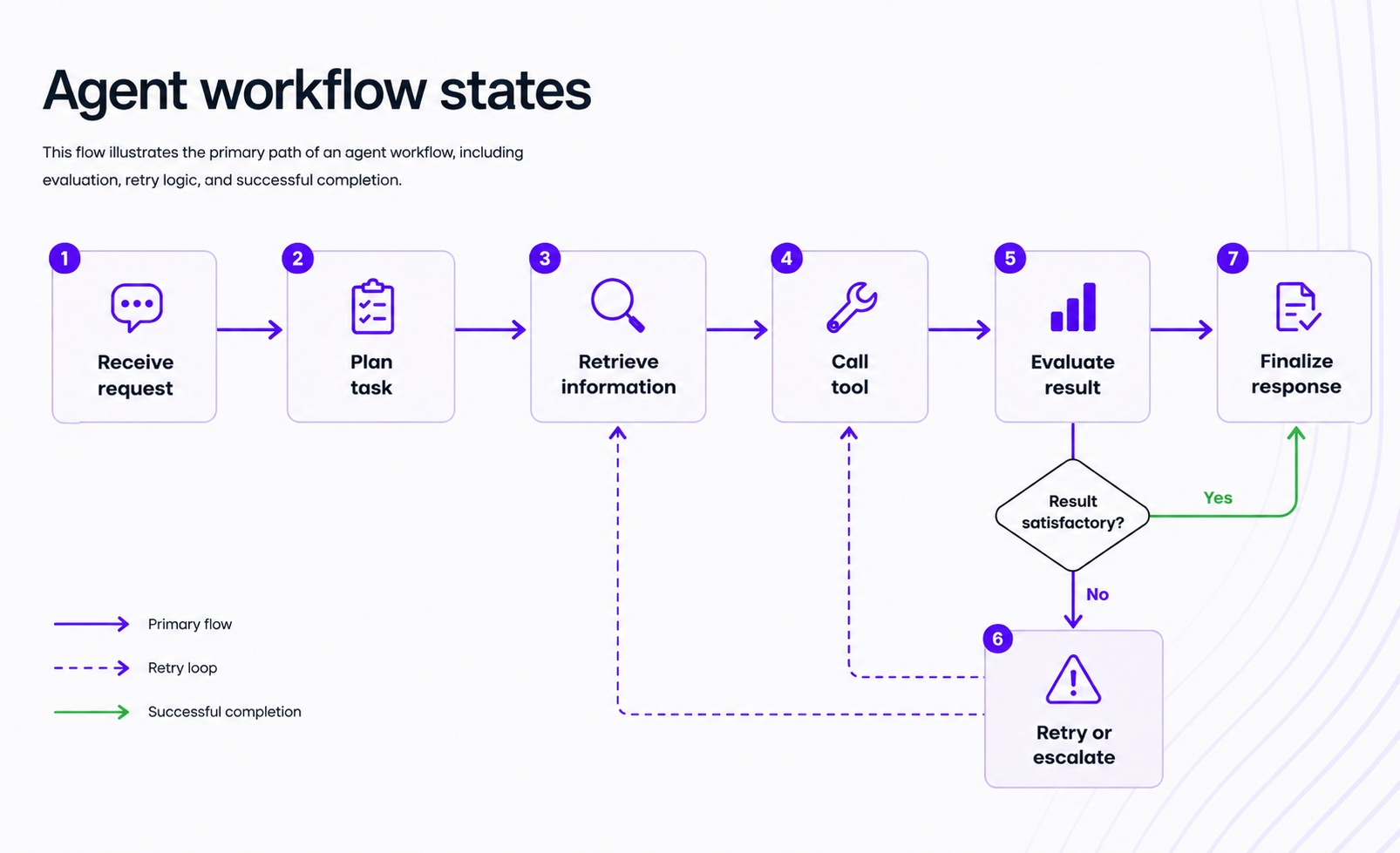
Each state has clear entry conditions, expected actions, and exit criteria. The agent knows where it is. The system knows what happened. Engineers can inspect the flow, identify where failures occur, and improve specific transitions without rebuilding the entire pipeline.
Without this structure, agent behavior becomes opaque. With it, behavior becomes predictable and debuggable.
What good state management changes
- Fewer repeated tool calls, because the agent knows what it already retrieved
- Better handling of partial failures, because the system can retry a specific step instead of restarting
- A clearer audit trail of what happened and why
- More reliable completion of multi-step tasks
- Easier debugging and evaluation of agent performance
Teams need systems they can inspect, improve, and trust. State management is what makes that possible.
Moving beyond RAG: building smarter, context-aware agents
Let’s be honest, most RAG pipelines we see out there are passive. They retrieve context once, pass it to the model, and hope the first query was good enough. For straightforward lookups, that works. For messy, ambiguous, or multi-part knowledge tasks, it falls apart quickly.
Basic RAG vs agentic RAG
| Basic RAG | Agentic RAG | |
|---|---|---|
| How retrieval works | Single query, one-pass retrieval | Retrieval inside a reasoning loop with iteration |
| Strengths | Simpler, faster, easier to build | Adaptive, self-correcting, handles ambiguity |
| Limitations | Brittle if the first query is weak or the answer spans multiple sources | More complex, higher latency, dependent on state tracking |
| Best fit | Well-defined questions with clear retrieval targets | Open-ended research, multi-source synthesis, tasks requiring evidence evaluation |
The tradeoff is real. Basic RAG is cheaper and faster to deploy. Agentic RAG handles harder problems but demands more from the system, especially from state management.
Why retrieval needs memory and feedback loops
In many knowledge tasks, the first retrieval attempt returns incomplete or irrelevant results. A stronger agent can detect that gap. It can evaluate whether the retrieved evidence actually answers the question, reformulate the query, target a different source, and try again.
That requires tracking what was queried, what came back, whether the evidence was sufficient, and what the next retrieval attempt should target. This is where state management turns retrieval from a static lookup into part of the agent’s reasoning process.
Case study lens: Zillow’s iBuying failure as a lesson in brittle decision systems
Zillow’s iBuying program offers a useful analogy. The company used automated pricing models to make real-time home purchase decisions in a volatile housing market. When market conditions shifted, the models did not adapt quickly enough. The system lacked robust mechanisms to revisit assumptions, gather contradictory evidence, or adjust when the first pass turned out to be wrong. The result was $500 million in losses.
This is not a claim that Zillow was building agentic RAG. The lesson is about what happens when high-stakes decisions rely on brittle, one-pass systems without iterative feedback. Any agent making consequential decisions, whether about home prices or customer escalations, needs the ability to detect when conditions have changed and respond accordingly. That ability depends on state.
The strategic role of multi-agent systems in modern workflows
Some workflows are too complex or too varied for a single agent to handle well. Multi-agent systems distribute work across specialized agents, each with a defined role, working together toward an outcome.
The restaurant analogy for multi-agent systems
Think about how a restaurant operates. The host receives guests and routes them. The server takes orders and coordinates. The cook executes specialized preparation. The expeditor checks quality before food leaves the kitchen. The cashier handles the final transaction.
The restaurant works because each role is clearly defined and enough context is shared for handoffs to succeed. The server does not need to know how to cook. The cook does not need to manage the bill. But both need to know what was ordered.
Multi-agent systems follow the same logic. A router agent handles intake. A research agent gathers data. A specialist agent executes a task. An evaluator agent checks the output. Without coordination, everyone repeats work or misses steps.
Common multi-agent patterns
| Pattern | How it works | Strengths | Tradeoffs | Best use case |
|---|---|---|---|---|
| Orchestrator | One controller agent assigns tasks, tracks progress, and manages sequencing | Clear visibility, simpler governance, easier debugging | Single point of failure, can bottleneck at scale | Structured workflows with defined stages |
| Peer-to-peer | Agents coordinate directly, passing work and context between themselves | Flexible, can parallelize more easily | Harder to debug, risk of lost context or duplicate work | Dynamic tasks where roles shift or overlap |
Architecture choices here directly affect reliability. The orchestrator pattern gives you more control and observability. The peer-to-peer pattern gives you more flexibility. Neither is universally better. The right choice depends on how predictable your workflow is and how much coordination overhead you can manage.
Why state matters even more in multi-agent systems
Each agent in a multi-agent system may maintain its own local context. But the system also needs shared state: who owns the current task, which subtasks are complete, what blockers remain, what evidence has been gathered, and what criteria must be met before the workflow is done.
Without shared state, multi-agent systems produce familiar failures: duplicate work, contradictory outputs, lost handoffs, and unclear completion status. As systems become more capable and distributed, state management becomes more important, not less.
What tutorials on building AI agents usually miss
The typical tutorial follows a predictable pattern: connect an LLM, define a tool, loop until done, celebrate. That pattern teaches how to start an agent. It does not teach how to build one that works.
Short demos are useful for learning basics. They are a poor model for production design. The gaps are consistent: no durable task tracking, no retry logic, no observability into what the agent did or why, and no support for branching workflows. These are the exact capabilities that separate a prototype from a system someone can rely on.
The difference between a good demo and a working system
A demo proves a possibility. A working system handles variability, interruption, failure, and task progress over time. The jump from one to the other is where state management matters most. A demo can afford to be stateless. A working system cannot.
Conclusion
Tools make agents capable. State makes agents dependable. That distinction is the central argument of this article and the gap most introductory content never addresses.
The progression matters: tools enable action, state enables continuity, agentic RAG adds iterative context gathering, and multi-agent systems increase specialization but also coordination demands. Each layer adds capability. Each layer also raises the bar for how carefully the system must track what is happening.
Building AI agents that can complete real work, not just generate plausible text, requires thinking beyond the prompt loop. The professionals who stand out are the ones who understand how to move from experiment to production. That means understanding orchestration, state, and system design, not just model selection.
If you want to go deeper into how modern agent systems use tools, retrieval, orchestration, and state to solve real tasks, Udacity’s Agentic AI program is a practical next step.