Last Updated on May 27, 2025
The world of Natural Language Processing (NLP) has undergone a seismic shift in recent years, moving from complex, task-specific architectures to powerful, general-purpose models. At the forefront of this revolution lies Hugging Face Transformers, a library that has democratized access to cutting-edge NLP, making it easier than ever for beginners and experts alike to build sophisticated language-based applications.
I remember my research internship, where I was tasked with developing a Human Activity Recognition system using 3D CNNs. While not strictly an NLP task, the underlying challenge of leveraging complex pre-trained models and then adapting them to a specific dataset resonated deeply. We spent countless hours wrestling with obscure libraries, deciphering research papers to understand architectural nuances, and painstakingly converting pre-trained weights to fit our framework. It was a steep learning curve, demanding significant effort just to get the foundational pieces in place.
Then, when I later encountered Hugging Face, it was like a revelation. The seamless access to thousands of pre-trained models, the unified API, and the straightforward fine-tuning capabilities felt revolutionary. It truly democratized access to advanced models, allowing practitioners to focus their energy on the exciting part: solving real-world problems, rather than getting bogged down in the intricacies of implementation. This shift, from battling with raw model architectures to effortlessly leveraging pre-trained power, is precisely what Hugging Face brings to the NLP world, and it’s why I’m so excited to share this article with you.
What are Transformers in NLP?
At the heart of the Hugging Face revolution lies the Transformer architecture. Introduced in 2017, Transformers moved away from the sequential processing of Recurrent Neural Networks (RNNs) and embraced a mechanism called self-attention.

This allows the model to weigh the importance of different words in a sentence when processing each word, capturing long-range dependencies with remarkable effectiveness. Transformers excel at understanding context and have become the foundation for many of the most powerful language models we see today. Hugging Face makes it incredibly easy to harness the power of these sophisticated architectures.
If you want to dive deeper then you can check out this Udacity blog: Understanding Transformer Architecture: The Backbone of Modern AI
Popular Pretrained Models
Hugging Face boasts a vast collection of pre-trained models, each with its own strengths and intended use cases. Here are a few popular examples you’ll often encounter:
- BERT (Bidirectional Encoder Representations from Transformers): A powerful encoder-only model excellent for tasks like text classification, question answering, and named entity recognition. It excels at understanding the context of words in both directions.
- GPT-2 (Generative Pre-trained Transformer 2): A decoder-based model renowned for its text generation capabilities. It’s trained to predict the next word in a sequence and can produce surprisingly coherent and creative text, like writing articles or poems.

- DistilBERT: A smaller, faster, and lighter general-purpose transformer model derived from BERT. It retains most of BERT’s performance while being more efficient in terms of memory usage and inference speed, making it suitable for deployment on less powerful hardware.
- T5 (Text-to-Text Transfer Transformer): A versatile model that frames all NLP tasks, from translation to question answering, as text-to-text problems. This means both the input and the output are always text sequences. It uses both encoder and decoder components and has shown strong performance across a wide range of tasks, including translation, summarization, and question answering, making it a strong all-around model.

Setting Up the Hugging Face Library
Now, let’s move beyond the theoretical and dive into the practical aspects of leveraging the Hugging Face Transformers library for the NLP endeavors.
- Installation: To begin your journey with Hugging Face Transformers, the initial step involves installing the library. Simply open your terminal or command prompt and execute the following command:
pip install transformers
Note: You have to ensure that Pytorch or Tensorflow is already installed on your system else you will receive this message “None of PyTorch, TensorFlow >= 2.0, or Flax have been found”.
You can install pytorch by a simple pip command.
pip install torch torchvision
- Model Loading: One of the key strengths of Hugging Face is the ease with which you can load pre-trained models. Using the AutoModelForSequenceClassification, AutoTokenizer, and similar classes, you can load a model and its associated tokenizer with just a few lines of code. Here is an example to load a pre-trained BERT model for sequence classification:
from transformers import AutoModelForSequenceClassification, AutoTokenizer
# Specify the pre-trained model name to use (in this case, a basic BERT model)
model_name = “bert-base-uncased”
# Load the pre-trained model for sequence classification
model = AutoModelForSequenceClassification.from_pretrained(model_name)
# Load the corresponding tokenizer for the pre-trained model
tokenizer = AutoTokenizer.from_pretrained(model_name)
Here, bert-base-uncased is the name of the specific pre-trained BERT model we want to use. Hugging Face handles downloading the model weights and configuration automatically.
- Tokenizer Basics: Tokenizers are essential for preparing your text data for the model. They convert raw text into a format that the model can understand (numerical IDs). The AutoTokenizer class automatically loads the correct tokenizer associated with the pre-trained model. You can use the tokenizer to encode your text:
# Define the input text that we want to process
text = “Hello, how are you?”
            # Tokenize the input text and convert it into a format that the model can understand
            # ‘return_tensors=”pt”‘ specifies that we want the output as PyTorch tensors
encoded_input = tokenizer(text, return_tensors=”pt”)
# Print the encoded input, which includes token IDs and attention masks
print(encoded_input)
The return_tensors=”pt” argument tells the tokenizer to return PyTorch tensors (you can use “tf” for TensorFlow).
Fine-Tuning for Your Own Data
While pre-trained models have learned general language representations, fine-tuning them on your specific dataset can significantly improve performance on your target task. Let’s walk through a basic text classification example using a hypothetical dataset of movie reviews labeled as positive or negative.
- Prepare Your Data: Organize your data into a format that Hugging Face’s training scripts can understand. Each observation should contain the text input and its corresponding label.
- Load Model and Instantiate Tokenizer: As demonstrated in the “Setting Up” section, you’ll need to load the appropriate pre-trained model and its corresponding tokenizer. For text classification, a BERT-based model (like bert-base-uncased or a task-specific variant) is often a good starting point due to its strong contextual understanding.
- Tokenize the Data: Before feeding your text data to the model, it needs to be tokenized and encoded into numerical representations. This is where the tokenizer comes into play. You’ll use the loaded tokenizer to process the text data, converting words into numerical identifiers for each token and creating attention_masks (indicating which tokens should be attended to by the model).
- Define Training Arguments: Use the TrainingArguments class from the transformers library to configure your training parameters, such as:
- output_dir: The directory where your trained model and training logs will be saved.
- learning_rate: The step size at which the model’s weights are updated during training.
- per_device_train_batch_size: The number of training examples processed in parallel on each device (GPU/CPU).
- num_train_epochs: The number of times the entire training dataset will be passed through the model.
- eval_strategy: When to perform evaluation on your evaluation dataset (e.g., at the end of each epoch).
- Create a Trainer: The Trainer class simplifies the fine-tuning process. You’ll need to provide it with your model, training arguments, training dataset, evaluation dataset, and the tokenizer.
- Train the Model: With everything set up, initiating the fine-tuning process is as simple as calling the train() method on your Trainer object. The Trainer will then manage the training loop, iterating through your training data, updating the model’s weights based on the loss function, and periodically evaluating its performance on the evaluation dataset according to your specified eval_strategy. This process allows the pre-trained model to adapt its general language understanding to the specific nuances and vocabulary of your movie review dataset, ultimately leading to improved classification accuracy.
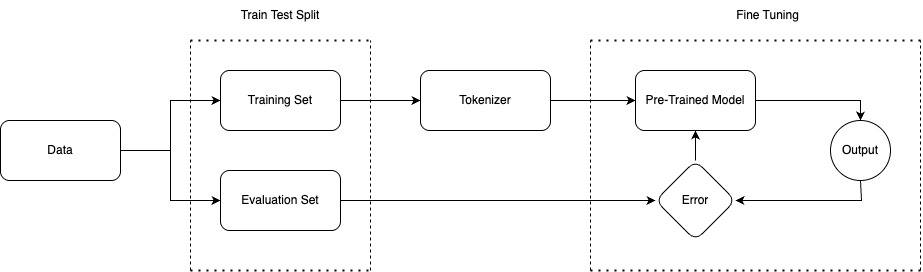
Here’s a simplified code snippet illustrating the key steps:
from transformers import AutoModelForSequenceClassification, AutoTokenizer, TrainingArguments, Trainer
from datasets import load_dataset
# Load the IMDb dataset
dataset = load_dataset(“imdb”)
train_dataset = dataset[“train”]
eval_dataset = dataset[“test”]
# Specify the pre-trained model name to use
model_name = “bert-base-uncased”
# Load the pre-trained BERT model specifically for sequence classification
# ‘num_labels=2’ indicates that our task has two output classes (positive and negative)
model = AutoModelForSequenceClassification.from_pretrained(model_name, num_labels=2)
# Load the corresponding tokenizer for the pre-trained BERT model
tokenizer = AutoTokenizer.from_pretrained(model_name)
# Define a function to tokenize and preprocess the text
def tokenize_function(examples):
return tokenizer(examples[“text”], truncation=True, padding=”max_length”)
# Apply the tokenization function to the entire training dataset in batches for efficiency
tokenized_train_dataset = train_dataset.map(tokenize_function, batched=True)
# Apply the same tokenization function to the entire evaluation dataset in batches
tokenized_eval_dataset = eval_dataset.map(tokenize_function, batched=True)
# Define the arguments for the training process
training_args = TrainingArguments(
output_dir=”./results”,
learning_rate=2e-5,
per_device_train_batch_size=16,
per_device_eval_batch_size=16,
num_train_epochs=3,
eval_strategy=”epoch”,
)
# Create a Trainer instance, which handles the training and evaluation loop
trainer = Trainer(
model=model,
args=training_args,
train_dataset=tokenized_train_dataset,
eval_dataset=tokenized_eval_dataset,
tokenizer=tokenizer,
)
# Start the fine-tuning process
trainer.train()
Working with the Hugging Face Hub
The Hugging Face Hub is a central platform for discovering and sharing pre-trained models, datasets, and even code. The platform contains over 900k models, 200k datasets, and 300k demo apps (Spaces), all open source and publicly available.
- Models: Explore a vast repository hosting the latest state-of-the-art pre-trained models, encompassing a wide spectrum of architectures and tasks across Natural Language Processing, Computer Vision, and Audio processing domains, readily downloadable for your projects.
- Datasets: Discover and access an extensive collection of meticulously curated datasets, featuring a diverse array of data formats and modalities tailored for various machine learning tasks and research across numerous domains, simplifying your data acquisition process.
- Spaces: Engage with interactive applications directly within your web browser, demonstrating the real-world capabilities and functionalities of various machine learning models, allowing for intuitive exploration and understanding of their potential applications.
If you want to contribute, and you have a fine-tuned model that you’re proud of, you can easily upload it to the Hub, making it accessible to the wider NLP community. This involves using the push_to_hub() method of your model and tokenizer.
Continue your Journey
Hugging Face Transformers has truly lowered the barrier to entry for NLP, empowering beginners to leverage the power of state-of-the-art models with ease. We encourage you to explore the vast models on the Hugging Face Hub, experiment with loading different pre-trained models, and most importantly, try fine-tuning them on your own datasets to tackle real-world NLP challenges. To effectively enhance your abilities and gain hands-on experience in this evolving field, consider Udacity’s
- Generative AI Nanodegree program: This program offers a comprehensive journey, starting with foundational fluency in core concepts and ethical considerations. You’ll then delve into the power of Large Language Models, mastering architectures like GPT and building practical text generation projects for chatbots and beyond. Explore the exciting intersection of Computer Vision and Generative AI, learning to generate and manipulate images using cutting-edge techniques
- Large Language Models (LLMs) & Text Generation: You will not only master Transformer architectures like GPT but also implement a real-world project focused on generating creative and coherent text for applications like chatbots.