

Last Updated on October 23, 2024
Find the right nanodegree program for you.
So you’ve just finished your Udacity course final! Congratulations! Now, how do you tell the world?
Follow these three easy steps:
- In the top right Welcome, (Student Name) menu, access the My Transcript page.

- Click the Complete Course button next to the course.
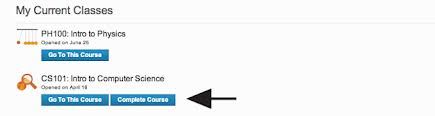
- Your certificate will be ready for download in a couple of minutes!

NOTE: You can always return and continue taking a course if you feel like you need more time for mastery.
Here at Udacity, we want you to succeed. Even after you have completed a course, all of your work from the class is saved. Therefore, you can improve the level of achievement on your certificate by re-enrolling and resubmitting your final. Course forums and all learning materials will be fully accessible to you even if you have already completed the course.
Also, even if you’ve finished a course, you can always go back and review the material without enrolling.


