Last Updated on September 28, 2026
C++ streams are the standard way a C++ program reads input and writes output. A stream is a flow of data between your program and a source or destination. That source might be the keyboard, the console, or a file on disk.
The word “stream” sounds abstract at first. In practice, it just means reading from somewhere or writing to somewhere. If you have used cin to get user input or cout to print a result, you have already used C++ streams.
That same model extends to files. ifstream reads data from a file. ofstream writes data to a file. The interface stays consistent across both console and file handling.
This article covers the four core stream classes and where each one fits in real C++ input output work. We will look at how the stream hierarchy connects them, walk through practical examples, and flag the mistakes that trip up most beginners.
What are C++ streams?
In C++, a stream refers to a sequence of characters transferred between the program and an input/output device. That device could be the console, a file, or another data source. The stream abstraction lets you use the same general approach regardless of where the data comes from or goes.
In everyday terms, a stream is like a pipe. Data flows through it in one direction. An input stream moves data into your program. An output stream moves data out.
This matters because it gives you a consistent interface. Reading a line from a file looks similar to reading a line from cin. Writing to a file looks similar to writing to cout. The underlying mechanics differ, but the code you write stays familiar.
These classes have specific features to handle program input and output, making it easier to write portable code that works the same way across platforms and I/O sources.
To use streams in C++, you include the appropriate header file:
#include <iostream>for console input and output (cin,cout)#include <fstream>for file streams (ifstream,ofstream)
The four core C++ stream classes
If you are new to C++ streams, start with istream, ostream, ifstream, and ofstream before worrying about the full class hierarchy. These four classes cover the vast majority of beginner and intermediate I/O work.
| Class | Purpose | Reads or writes? | Common example | Typical use |
|---|---|---|---|---|
istream | General input stream | Reads | cin | Console input |
ostream | General output stream | Writes | cout | Console output |
ifstream | Input file stream | Reads | File object opened for reading | Loading file data |
ofstream | Output file stream | Writes | File object opened for writing | Saving results, logs, reports |
Each class handles one clear job. istream and ostream cover standard console I/O. ifstream and ofstream extend that same pattern to file handling. Once you understand these four, the rest of the stream library becomes much easier to approach.
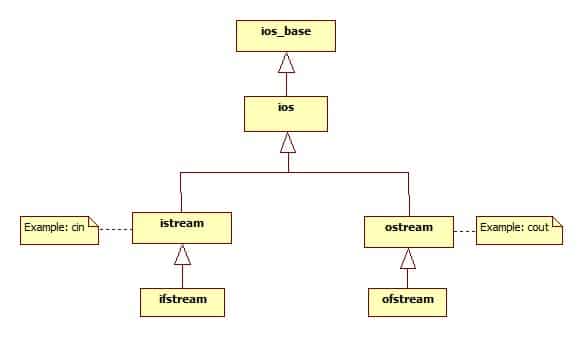
How the stream hierarchy works
C++ streams use inheritance. The ios class sits at the base of the hierarchy. istream and ostream both inherit from ios. File stream classes build on top of those: ifstream inherits from istream, and ofstream inherits from ostream.
The practical meaning is straightforward. File streams behave like other streams because they inherit familiar input or output behavior from their parent classes. That is why reading from a file with ifstream often looks nearly identical to reading from cin. The operations carry over.
iostream, which you include for console I/O, combines both istream and ostream capabilities. But you rarely need to think about iostream as a class on its own. The objects cin and cout are the parts you interact with directly.
Most beginners get better results by learning the common stream objects first and treating the hierarchy as background knowledge. It is useful context, not something you need to memorize before writing working code.
Using istream for input
The istream class handles input. Its most common instance is cin, which reads from standard input (typically the keyboard).
istream provides several member functions for different input needs:
get()reads a single charactergetline()reads an entire line, including spaces, up to a newlineread()reads a fixed number of characters into a bufferignore()skips a specified number of characters in the streamputback()places a character back into the stream for re-reading
These are not interchangeable. get() handles one character at a time. getline() captures a full line, which is what you want when input includes spaces. The >> extraction operator, by contrast, stops at whitespace. Choosing the wrong one is a common source of bugs when parsing mixed input.
A simple example using cin.get():
#include <iostream>
using namespace std;

int main() {
    char a;
    cin.get(a);
    cout << a;
    return 0;
}
This reads a single character from the console and prints it back. For most interactive input, you will use >> or getline() more often, but get() is useful when you need character-level control.
Using ostream for output
The ostream class is the output side of C++ streams. Its most familiar instance is cout, which writes to standard output (typically the console).
The most common way to use ostream is through the << insertion operator. That covers formatted output: printing strings, numbers, and variables in a readable way.
ostream also provides lower-level member functions:
put()writes a single characterwrite()writes a block of characters from a buffer
For most beginner C++ work, cout and << are all you need. The put() and write() functions matter more when you need fine-grained character output or are working with binary data.
#include <iostream>
using namespace std;

int main() {
    char u = 'A';
    cout.put(u);
    return 0;
}
This writes a single character to the console. In practice, you will reach for << far more often, but knowing put() and write() exist helps when the task requires precise control over what gets written.
Reading files with ifstream
ifstream is used to read data from a file. It requires #include <fstream>. Because ifstream inherits input behavior from istream, many of the same operations you use with cin work the same way with a file stream.
The practical workflow follows a consistent pattern:
- Include
<fstream> - Create an
ifstreamobject - Open a file (either in the constructor or with
.open()) - Check whether the file opened successfully
- Read data using
>>,getline(), or other input functions - Close the file when done
Always verify that the file opened before reading from it. Skipping this check is one of the most common beginner mistakes and leads to silent failures.
#include <fstream>
#include <iostream>
#include <string>
using namespace std;

int main() {
    ifstream inFile("data.txt");
    if (!inFile) {
        cout << "Could not open file." << endl;
        return 1;
    }
    string line;
    while (getline(inFile, line)) {
        cout << line << endl;
    }
    inFile.close();
    return 0;
}
Real use cases include loading configuration files, reading saved text data, processing logs, and parsing CSV-like structured input. The key idea: file input is just cin-style reading pointed at a file instead of the keyboard.
Writing files with ofstream
An ofstream is an output file stream. Once the stream is opened successfully, you use it just like cout. The destination changes from the console to a file, but the interface stays the same.
#include <fstream>
using namespace std;

int main() {
    ofstream outFile("results.txt");
    if (!outFile) {
        return 1;
    }
    outFile << "The minimum oxygen percentage is 19.5%" << endl;
    outFile.close();
    return 0;
}
This creates a file called results.txt and writes a line of output to it. The << operator and endl work exactly as they do with cout.
File output is useful in real programs for saving reports, exporting processed results, writing logs, and sending debug output to a file instead of cluttering the console. As with ifstream, always verify the stream before writing. A failed open means your data goes nowhere.
Common use cases for C++ streams
Streams are the standard I/O model in C++ because they apply cleanly across different tasks:
- Reading and writing files. Configuration data, saved program output, logs, and exported results all flow through file streams.
- Parsing input. Structured text such as CSV-like rows, simple data files, or command-line style input can be read and processed using stream operations like
getline()and>>. - Debugging. Printing variable values to
coutduring development is the most basic debugging tool in C++. You can also redirect diagnostic output to a file for later review. - Network-related I/O. At a broader level, the stream abstraction models data movement beyond just the console and files. Network libraries often follow similar patterns for reading and writing data over connections.
The consistent interface is what makes C++ streams practical across all of these scenarios. Whether the data comes from a user, a file, or another source, the way you read and write it stays familiar.
Common beginner mistakes to avoid
A few issues come up repeatedly when learning C++ streams:
- Forgetting the right header. Use
<iostream>forcinandcout. Use<fstream>forifstreamandofstream. Missing the correct include produces confusing compiler errors. - Mixing up input and output classes.
ifstreamreads.ofstreamwrites. Using the wrong one compiles but does not do what you expect. - Assuming a file opened successfully. Always check the stream state before reading or writing. A missing file or permission issue will not throw an error by default. It just silently fails.
- Treating
get(),getline(), and>>as interchangeable. Each handles input differently.>>stops at whitespace.getline()reads the full line.get()reads one character. Choosing the wrong one leads to partial reads or skipped input. - Spending too much time on the full stream hierarchy. The class tree is useful context, but it is not something you need to memorize early. Learn
cin,cout,ifstream, andofstreamfirst. The rest will make more sense after you have written real I/O code.
What to learn next after C++ streams
Once you are comfortable with the four core stream classes, a few adjacent topics are worth exploring:
stringstreamlets you treat a string as a stream, which is useful for parsing and formatting data in memory without file I/O.- Stream states and error handling give you finer control over detecting end-of-file, read failures, and bad input.
- Output formatting with manipulators like
setw,setprecision, andfixedhelps when you need to control how numbers and text appear. - Broader C++ file handling workflows cover topics like binary file I/O, random access, and working with larger datasets.
These build naturally on top of what this article covers and connect directly to more complex C++ projects.
Conclusion
C++ streams are the standard model for input and output in the language. The four core classes, istream, ostream, ifstream, and ofstream, cover console I/O and file handling with a consistent, predictable interface.
You do not need to master the entire stream library to become productive. Once you understand these core stream types, you can build programs that read input, produce output, and handle files in a reliable way. That foundation supports everything from simple console tools to programs that process real data from files.
Expand your C++ skills
If you want hands-on practice beyond basic C++ streams, Udacity’s C++ Nanodegree takes you from core concepts to building real projects. You can also explore additional programming and development courses in the full catalog.